Best Document Parsing Tools for HR Teams in 2026
HR teams process passports, W-2s, payslips, contracts, and insurance cards daily. Here are the best tools to automate HR document data extraction — no coding required.

TL;DR
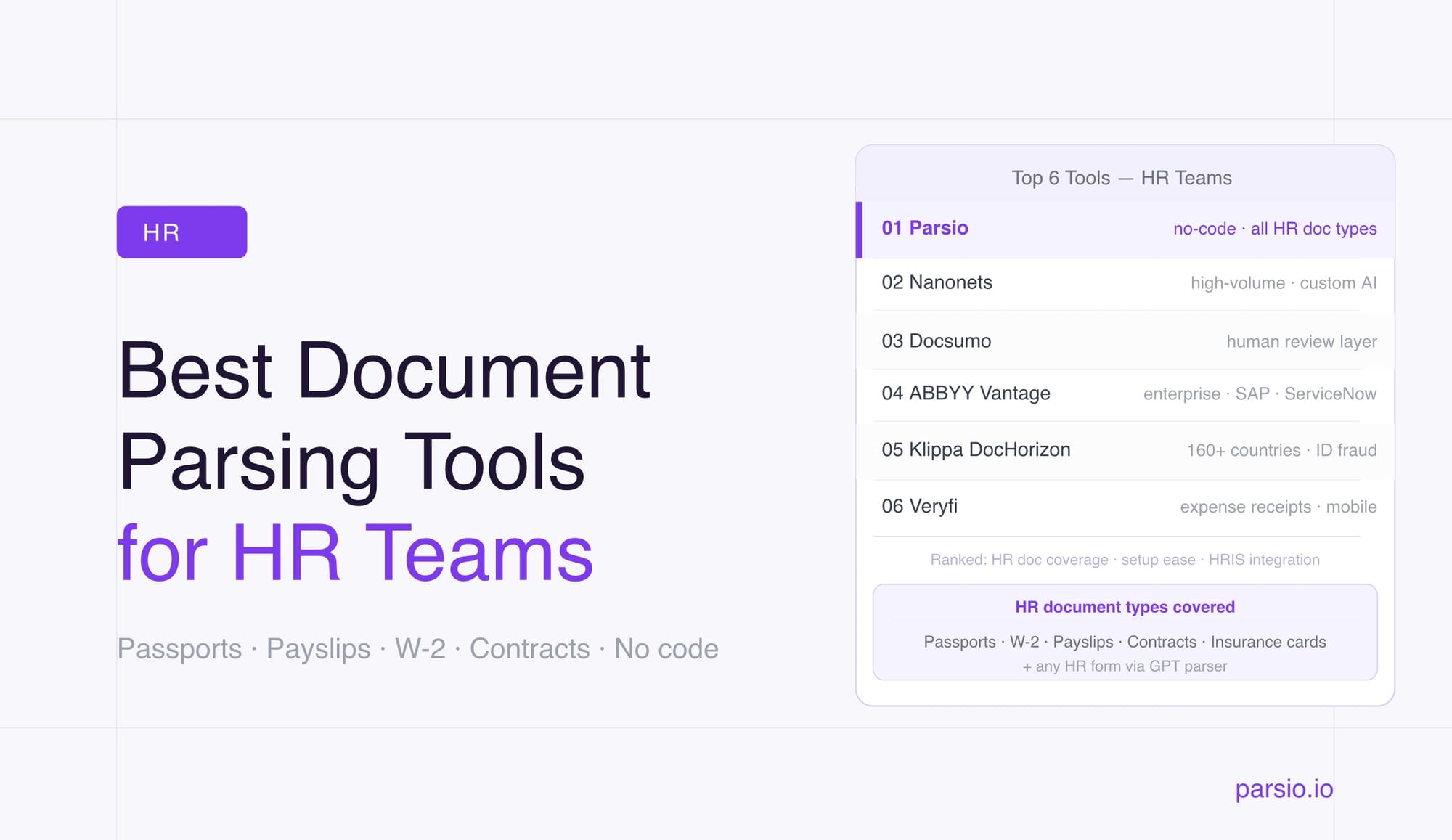
- The best document parsing tools for HR teams in 2026 are Parsio, Nanonets, Docsumo, ABBYY Vantage, Klippa DocHorizon, and Veryfi.
- Parsio is the strongest no-code fit for small to mid-sized HR teams: purpose-built AI models handle passports, pay stubs, W-2 forms, health insurance cards, and contracts out of the box — no templates required.
- For documents outside those standard types, Parsio's GPT-powered parser can extract any HR form automatically, generating the extraction prompt from a sample upload.
- Nanonets and Docsumo suit high-volume enterprise workflows where custom model training and human review layers are needed.
- ABBYY Vantage is the right call for large enterprises with complex validation requirements and existing enterprise platform investments.
- Klippa DocHorizon excels at international identity document verification across 160+ country formats.
- Veryfi is the specialist pick for expense receipt capture in HR and finance workflows.
The best document parsing tools for HR teams automatically extract structured data from the documents HR professionals handle every day — identity documents, pay stubs, W-2 forms, employment contracts, and health insurance cards — and route that data into an HRIS, spreadsheet, or automation workflow. The right tool depends on the document types your team processes most, your setup resources, and your volume.
This guide covers the six strongest options in 2026, how each handles the HR document stack, and a practical framework for choosing between them.
Why HR Teams Need Document Parsing Software
HR operations generate more structured document data than almost any other department. A single new hire creates a cascade of paperwork: a passport or national ID for identity verification, a signed employment contract, a W-4 for payroll setup, benefits enrollment forms, and sometimes an I-9 or visa document. Each of these requires specific fields to be captured and entered somewhere — an HRIS, a spreadsheet, a background check system.
Once employees are onboarded, the document flow continues. Monthly pay stubs feed into payroll reconciliation and audit trails. Annual W-2 forms need to be archived and distributed. Health insurance cards and flexible spending account statements arrive from multiple providers in different formats. Exit paperwork — final pay statements, COBRA notices, separation agreements — adds another layer.
Manual processing for each document type is slow and introduces errors. A typical HR generalist at a 100-person company can spend 4–6 hours per week on document data entry alone. Document parsing software eliminates that manual step: it reads the document, extracts the relevant fields automatically, and sends structured data to wherever it needs to go.
What to Look for in an HR Document Parsing Tool
Before evaluating specific platforms, map the five document types your team processes most often. The right tool is the one that handles your actual document stack — not just invoices or generic PDFs.
Identity documents. Passports, national IDs, and driver's licenses are common in onboarding and KYC compliance workflows. A good parser extracts name, date of birth, document number, nationality, and expiry date accurately from scanned or photographed documents, including machine-readable zone (MRZ) data from passports.
Pay stubs and payslips. These vary significantly by employer, pay frequency, and country. They combine header information (employee name, pay period, employer details) with tabular line items (earnings, deductions, net pay). Tools need reliable table extraction to handle them without losing row structure.
Tax forms. W-2 forms follow standard IRS layouts and are well-supported by dedicated pre-trained models. W-4, I-9, and equivalent forms for other countries vary more and may need a flexible extraction approach rather than a fixed model.
Employment contracts and NDAs. Longer documents with specific fields spread across pages — effective date, party names, jurisdiction, compensation terms. Template-based parsing is impractical because every company's contract layout differs. AI-based extraction handles this better.
Health insurance and benefit documents. Member ID, group number, plan name, and provider contact details are commonly needed for HR records. Insurance documents follow recognizable layouts that AI models can handle without custom setup.
Integration fit. Extracted data needs to reach an HRIS, Google Sheet, webhook, or automation platform. Confirm export options match your existing stack before committing to any tool.
The 6 Best Document Parsing Tools for HR Teams in 2026
1. Parsio — Best for Small to Mid-Sized HR Teams Handling Multiple Document Types
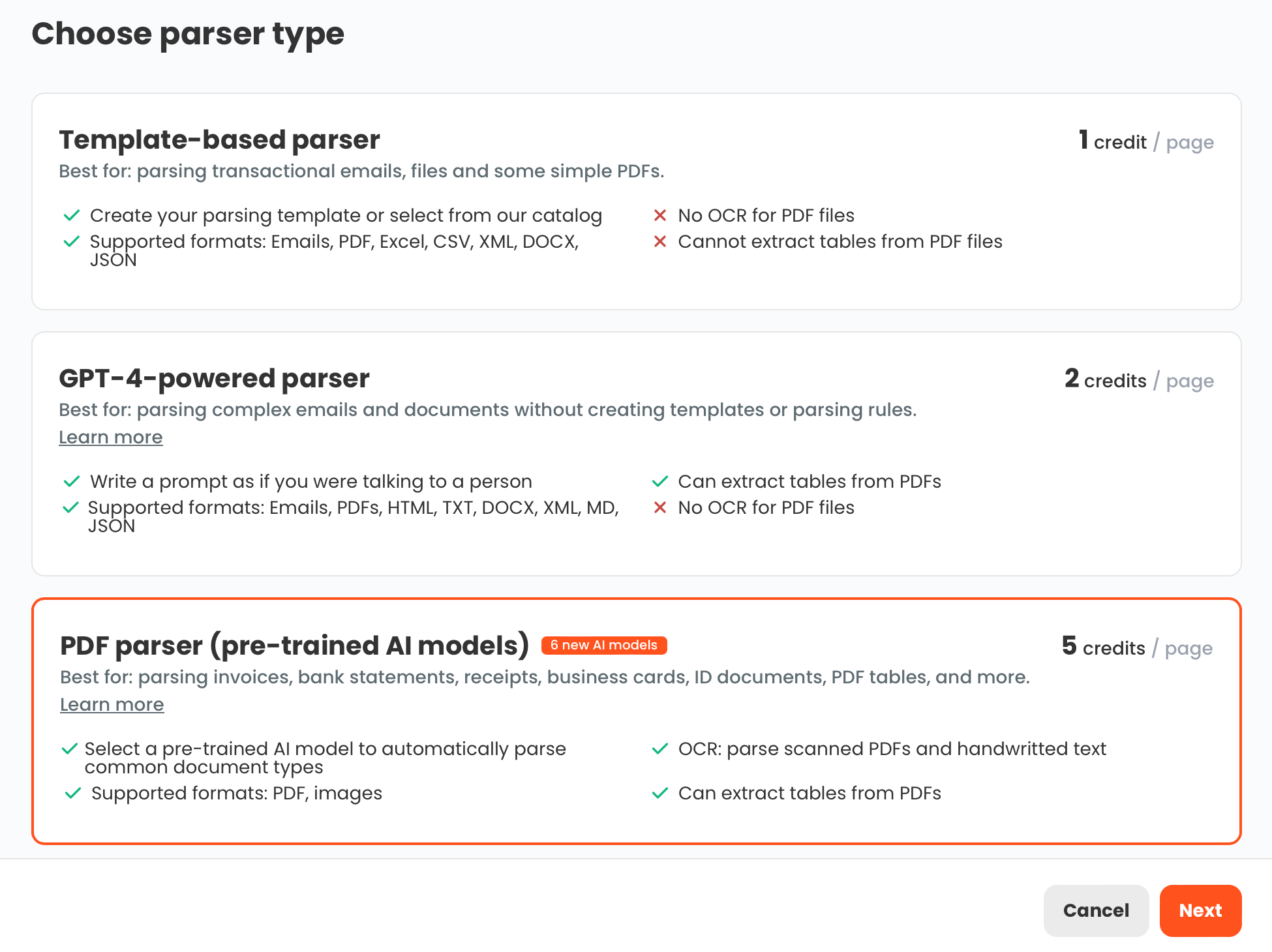
Parsio is a multi-engine document parsing platform that handles the full HR document stack without requiring templates or code for most document types. It uses four parser types — a template-based parser for fixed-layout emails, an AI-powered PDF parser with purpose-built models, a GPT-powered parser for variable layouts, and an OCR converter — and lets users choose the right engine for each document type.
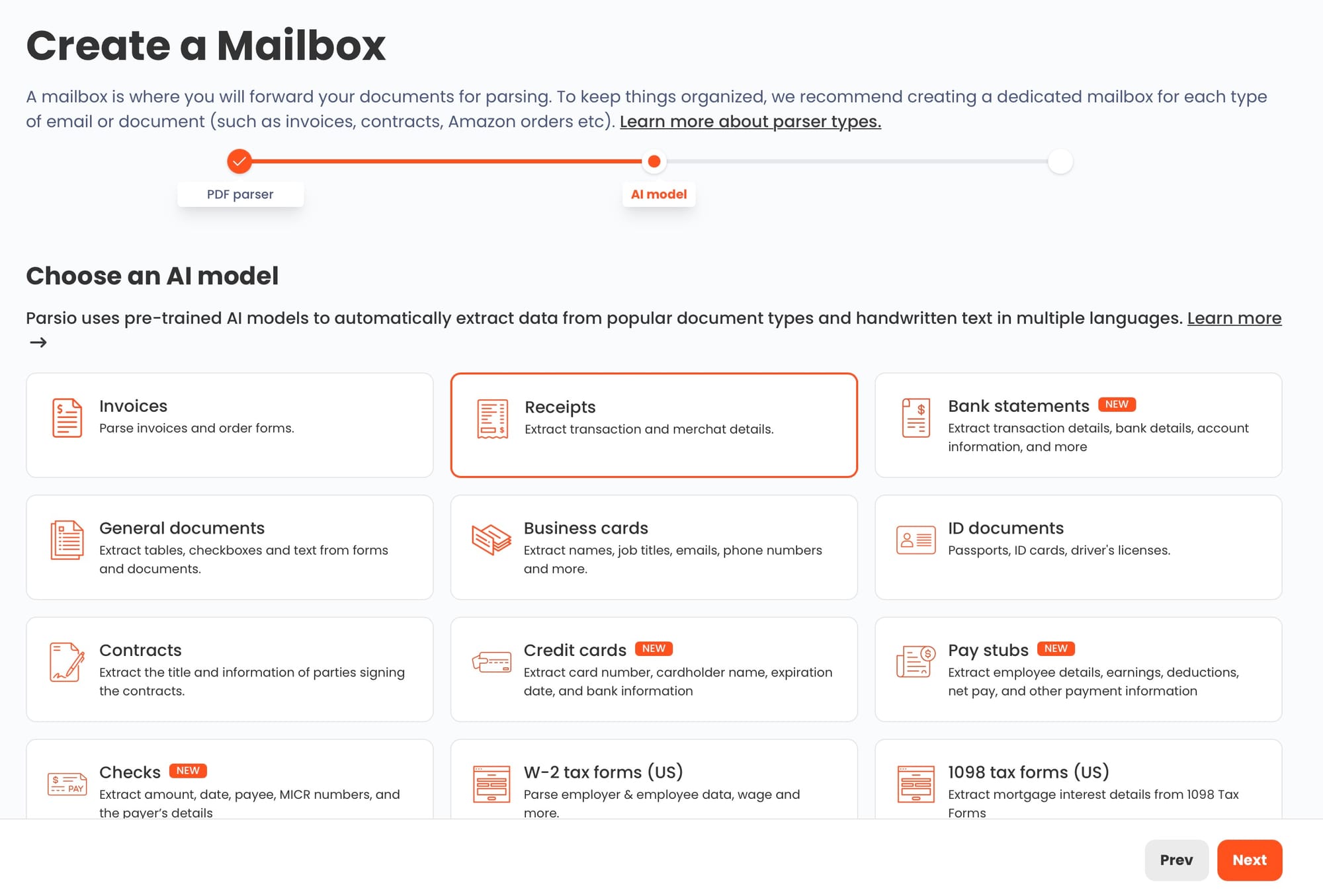
For HR workflows specifically, Parsio's AI-powered PDF parser includes dedicated models for:
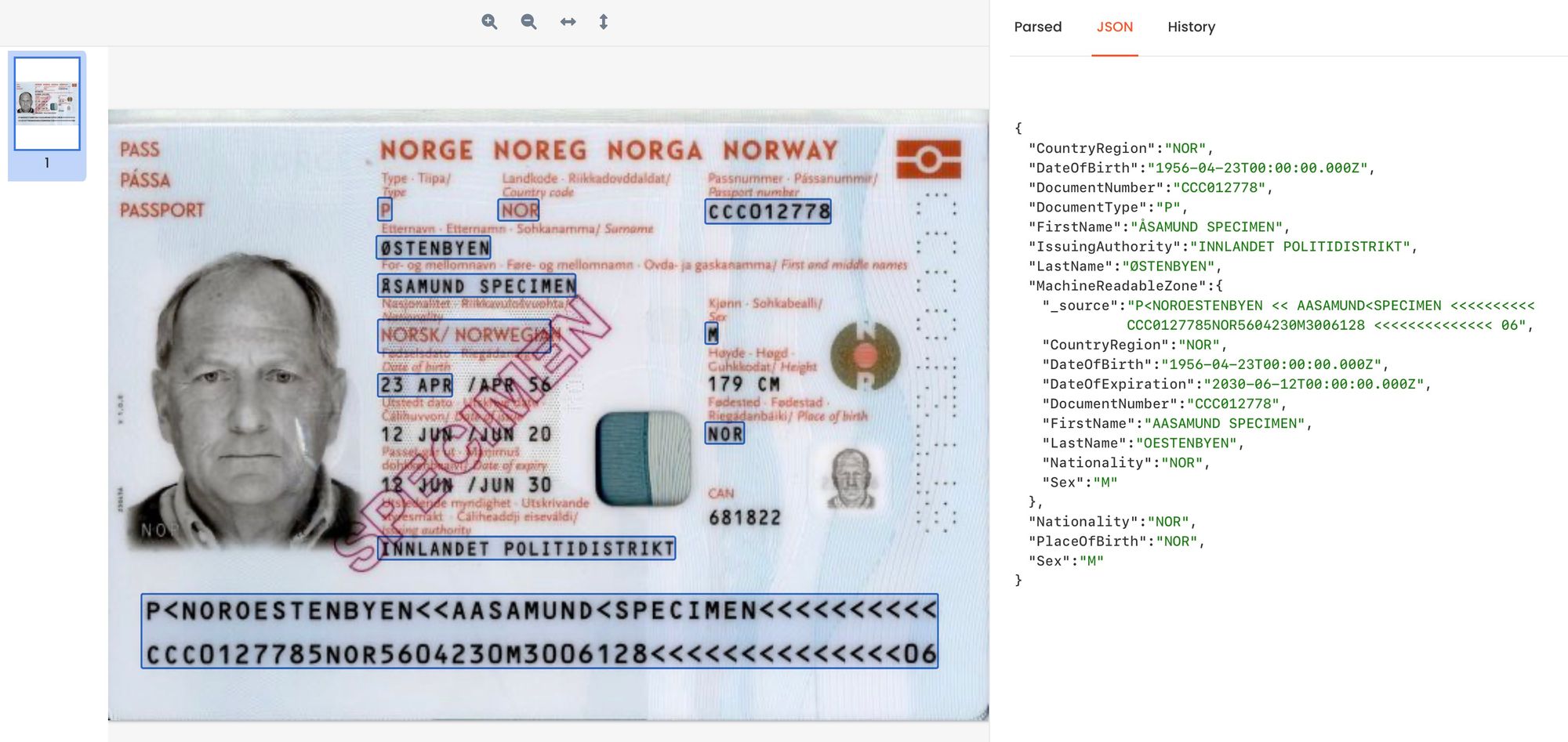
- Identity documents — passports, national IDs, and driver's licenses; extracts MRZ data, name, date of birth, document number, nationality, and expiry date
- Pay stubs and payslips — employee name, pay period, gross pay, deductions, net pay, and line-item table data
- W-2 forms (US) — dedicated model for the standard IRS W-2 layout including box-level field extraction
- Health insurance cards (US) — member ID, group number, and plan details
- Employment contracts — party names, effective dates, and key contract terms via a pre-trained AI model
- Business cards — name, title, company, phone, email, and address for contact and CRM workflows
For HR documents that fall outside those supported types — onboarding questionnaires, I-9 forms, benefit election forms, or any non-standard internal document — Parsio's GPT-powered parser extracts data from any layout without requiring templates. Parsio can automatically generate the extraction prompt from a single sample document upload, so HR teams do not need to write or manage AI prompts manually. This is the right recommendation for any document type not covered by a dedicated AI model.
Documents enter Parsio through email forwarding (useful when HR documents arrive as email attachments), manual upload, API, Zapier, or Make. Parsed data flows to Google Sheets, webhooks, CSV/Excel downloads, Zapier, Make, n8n, Airtable, and more. For teams where documents arrive by email — contracts, insurance cards, pay stubs forwarded from payroll systems — email-forwarding ingestion eliminates manual uploads entirely.
Setup for supported AI-model document types takes minutes: create an inbox, choose the document type model, and start sending documents. No training data, no templates to build. Pricing is designed for small to mid-sized teams with predictable monthly volumes.
See also: Extracting Data from ID Documents Using AI and OCR and How to Extract Data from Payslips Automatically.
Best for: HR and operations teams at SMBs and growing companies who need to automate extraction from multiple HR document types without code, templates, or AI prompt engineering.
Limitations: Not optimized for very high document volumes (thousands per day) or complex multi-step validation workflows common in large enterprise environments.
2. Nanonets — Best for High-Volume HR Workflows with Custom AI Models
Nanonets is an AI document processing platform built for high-volume workflows where document variety is high and accuracy requirements are demanding. It supports custom model training on your own document samples, which makes it a practical choice when your HR documents have unusual layouts not covered by standard pre-trained models.
For HR use cases, Nanonets performs well on identity verification, payroll documents, and compliance forms. Its human-in-the-loop review feature lets HR staff flag low-confidence extractions before data enters downstream systems — useful for compliance-sensitive workflows where errors carry legal or regulatory consequences. The platform integrates with major HRIS systems through its API-first architecture.
Best for: Enterprise or mid-market HR teams processing large volumes of diverse or non-standard HR documents who need a flexible AI model with a built-in review and correction layer.
Limitations: Custom model training requires labeled sample data and setup effort. Cost is consumption-based and scales with volume; typically better suited to organizations processing hundreds of documents per day than small HR teams.
3. Docsumo — Best for Teams That Need a Human Verification Layer
Docsumo is an intelligent document processing platform with a strong emphasis on structured extraction and human-in-the-loop review. Its verification workflow presents extracted fields to a reviewer for confirmation before they are written to a downstream system, which makes it popular in industries where document data has direct legal or compliance consequences.
For HR documents, Docsumo supports custom model training for non-standard layouts and handles multi-row table extraction well for pay stub and W-2 data. The platform includes pre-built models for common business document types, and its API supports integration with enterprise HR and ERP systems.
Best for: HR and compliance teams that need a structured review and approval process built into their document intake workflow, particularly in regulated industries where data accuracy must be verified before it enters a system of record.
Limitations: Requires more initial configuration than zero-template tools. Better suited to mid-market and enterprise buyers with dedicated IT resources than small HR teams.
4. ABBYY Vantage — Best for Enterprise HR and Compliance Workflows
ABBYY Vantage is an enterprise intelligent document processing platform used in large organizations that need high-accuracy, high-volume extraction with sophisticated validation rules. It handles complex multi-page documents reliably and supports advanced routing logic — useful for HR processes where document accuracy has direct legal or financial consequences.
ABBYY's Skill Marketplace includes pre-trained extraction models for a range of document types, and its integrations with enterprise workflow platforms — SAP, ServiceNow, Microsoft Power Automate, UiPath — make it a strong choice for organizations already running enterprise automation stacks.
Best for: Large enterprises with complex HR document workflows, strict validation requirements, audit trails, and existing investments in enterprise automation platforms.
Limitations: High price point and significant implementation effort. Not a practical choice for small HR teams, startups, or companies without dedicated automation engineers.
5. Klippa DocHorizon — Best for International Identity Document Verification
Klippa DocHorizon is an AI document processing platform with particular strength in identity document verification and fraud detection. It supports identity document formats from over 160 countries — covering passports, national IDs, driver's licenses, and residence permits — and includes active authenticity checks that flag potentially tampered or fraudulent documents.
For international HR and people operations teams that onboard employees across multiple countries, Klippa's breadth of identity document support is a meaningful advantage. The platform is GDPR-compliant and offers data residency options for European teams handling personal identity data under strict data protection requirements. It also handles payslips, contracts, and benefit documents through its document processing API.
Best for: International HR and people operations teams with high volumes of identity document verification across multiple countries, especially where fraud detection and document authenticity checking are required.
Limitations: More expensive than general-purpose document parsers for teams that do not specifically need international ID verification coverage. Overengineered for domestic-only HR workflows.
6. Veryfi — Best for Expense Receipt Processing in HR and Finance Workflows
Veryfi is a receipt and expense document parsing platform built around fast, accurate mobile-first capture. HR and finance teams that process employee expense receipts — business travel, client entertainment, office supply purchases — can use Veryfi to extract vendor, date, amount, category, and line items from receipts in near real time.
Veryfi's mobile SDK is integrated into many expense management applications, and its API processes receipts and invoices with high accuracy. It is purpose-built for financial documents rather than the broader HR document stack, which makes it a specialist choice rather than a general HR parsing solution.
Best for: HR and finance teams whose primary document parsing challenge is employee expense receipt processing at scale, particularly in organizations with field-based or travel-heavy workforces.
Limitations: Focused on receipts and invoices; does not support identity documents, employment contracts, W-2 forms, or most other HR-specific compliance documents.
How to Choose the Right Document Parsing Tool for Your HR Team
Choosing the right tool comes down to three questions: what document types you process, how much setup effort you can invest, and what review process your compliance environment requires.
Start with document types. List the five HR documents your team handles most often. If they match standard, well-supported types — passports, W-2s, pay stubs, health insurance cards, employment contracts — a tool with dedicated AI models will work with minimal setup. If you process non-standard internal forms or country-specific compliance documents not covered by standard models, look for a tool that supports custom training or flexible GPT-based extraction.
Be honest about setup capacity. Enterprise platforms like ABBYY Vantage and Nanonets offer powerful validation and routing capabilities, but they require substantial implementation effort. For a 5–20 person HR team at a growing company, that complexity is rarely worth it. Tools that work out of the box for supported document types — choosing a model, forwarding documents, getting structured output — return faster value with less ongoing maintenance.
Consider volume and review requirements. If your team processes under a few hundred documents per month, most platforms will be cost-effective. For high-volume or legally sensitive workflows, a built-in human review layer prevents errors from propagating into HR records. Nanonets and Docsumo both provide this; Parsio's workflow integrations let teams route low-confidence results to a review step via Zapier or Make.
Check integration fit before committing. The most accurate parser fails if the data cannot reach your HRIS. Confirm the tool exports to or integrates with your specific destination — Google Sheets for lightweight workflows, a Zapier trigger for HRIS routing, a webhook for custom systems, or a native API for engineering-built pipelines. See also: A Step-by-Step Guide to KYC Automation for how identity document parsing fits into compliance onboarding workflows.
For most small to mid-sized HR teams, the practical recommendation is a tool that handles your highest-frequency document types (passports, W-2s, pay stubs) without templates, and falls back to GPT-based extraction for the rest. That combination covers the majority of HR document workflows without requiring engineering support or model training.
Frequently Asked Questions
What HR documents can be parsed automatically without templates?
Most standard HR documents can be parsed automatically using dedicated AI models. Identity documents — passports, national IDs, driver's licenses — are supported by pre-trained parsers that extract name, date of birth, document number, nationality, and expiry date, including machine-readable zone (MRZ) data. Pay stubs and payslips are handled by AI table extraction models that capture earnings, deductions, and net pay across varying employer formats. W-2 forms follow a fixed IRS layout and are well-supported by dedicated models. Health insurance cards, employment contracts, and business cards also have dedicated pre-trained models in platforms like Parsio. For any HR document that does not fit a standard type — onboarding questionnaires, I-9 forms, internal HR forms, or international compliance documents — a GPT-powered parser can extract structured data from any layout without requiring you to build a template. In Parsio, the extraction prompt for the GPT parser is generated automatically from a sample document upload, so HR teams do not need to write or manage prompts manually.
How do these tools handle sensitive HR data like identity documents and tax forms?
Most document parsing platforms designed for business use apply standard cloud security practices: encryption in transit (TLS) and at rest (AES-256), role-based access controls, and audit logging. For compliance-sensitive HR workflows, the relevant certifications to check are SOC 2 Type II (common for US business tools), GDPR compliance (required for European teams handling personal data), and HIPAA compliance if health-related benefit documents containing protected health information are in scope. Identity documents — passports, driver's licenses — are some of the most sensitive personal data categories under GDPR and equivalent regulations, so confirm that the tool allows document deletion after extraction and does not retain raw document images longer than your retention policy requires. Most enterprise-grade tools (ABBYY, Nanonets, Docsumo) offer data processing agreements and configurable data retention. For small-team use, check whether the vendor's standard terms cover your legal obligations before processing identity documents at scale.
Can document parsing tools integrate with our HRIS?
Document parsing tools are not HRIS platforms — they handle the document intake and data extraction step, then route structured data to the systems you already use. Integration happens through several mechanisms. Native integrations exist for common tools: Parsio, for example, has a built-in Google Sheets export and direct connections to Zapier, Make, and n8n, which can route parsed data to most HRIS platforms through those automation layers. API-first tools like Nanonets and Docsumo connect directly to HRIS systems through webhooks or REST API calls. ABBYY Vantage has native connectors for enterprise platforms including SAP SuccessFactors and ServiceNow. The key question is how your HRIS accepts incoming data: if it supports API webhooks or Zapier actions, most parsing tools can feed it. If your HRIS only accepts CSV imports, tools that export CSV (like Parsio) handle that too. Confirm your target integration path during a free trial or proof-of-concept before committing to a platform.
How long does setup take for HR document parsing?
Setup time varies significantly by document type and tool. For standard HR document types supported by dedicated AI models — passports, W-2 forms, pay stubs, health insurance cards — tools like Parsio require almost no configuration: create an inbox, select the document model, and start submitting documents. That takes under 15 minutes and produces usable results immediately. For non-standard documents or those needing custom extraction fields, the timeline depends on the approach. Template-based parsers require manually mapping fields for each document layout, which can take 30–60 minutes per template but creates reliable, repeatable extraction afterward. Custom AI model training with platforms like Nanonets or Docsumo requires uploading and labeling sample documents; depending on document complexity and sample quality, training takes hours to a few days. The GPT-powered approach in tools like Parsio sits between these: upload one sample document, the tool generates an extraction prompt automatically, and you can start processing within minutes without labeling data or building templates.
What is the difference between OCR and document parsing for HR workflows?
OCR (optical character recognition) converts a scanned document image or PDF into machine-readable text. It reads what is written but does not know what the text means. Document parsing takes that further: it extracts specific structured fields from the text and returns them as organized, labeled data. For HR workflows, OCR alone is rarely sufficient. If you scan a passport and run it through OCR, you get an unstructured block of text. A document parser reads that text and returns structured fields: given name, surname, date of birth, passport number, nationality, and expiry date — ready to be written into an HRIS or verification system. Similarly, an OCR'd pay stub gives you a wall of numbers; a document parser returns labelled fields: employee name, pay period, gross pay, net pay, and each deduction with its label and value. Parsio includes both an OCR converter for pure text conversion needs and AI-powered structured extraction for field-level HR data, which lets teams use a single platform for both document conversion workflows and structured HR data extraction.
Try Parsio for HR Document Automation
Parsio supports the full range of HR document types — passports, W-2 forms, pay stubs, health insurance cards, and employment contracts — with pre-trained AI models that require zero setup. For any other HR form, the GPT-powered parser extracts structured data automatically from a single sample upload.
No templates. No code. No AI prompt engineering.