How to Extract Data from Health Insurance Cards Automatically
Extract member ID, group number, copay amounts, pharmacy codes, and more from health insurance card images and PDFs automatically — no template setup required.

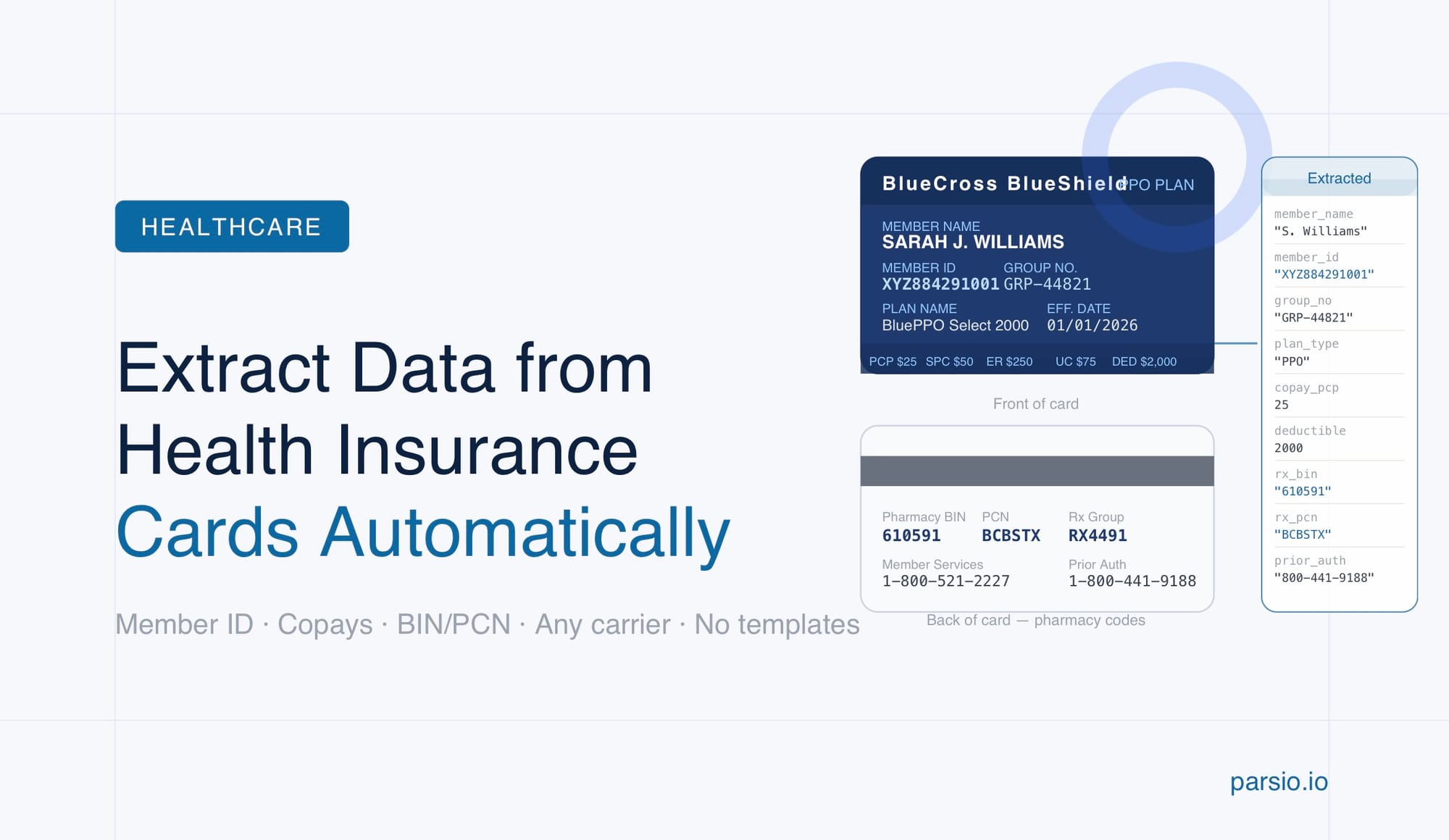
You can extract structured data from a health insurance card automatically using Parsio's AI-powered document parser — no OCR template, no manual field mapping, and no programming required. Upload the card image or PDF, select the pre-trained Health Insurance Cards model, and Parsio returns a structured JSON record with the member's plan details, copay amounts, pharmacy codes, and contact information ready to use in any downstream system.
Health insurance card data entry is one of the most repetitive tasks in healthcare front-office and billing workflows. Patient registration, prior authorization, and insurance verification all depend on the same handful of fields from a card that arrives as a photo, a scan, or a PDF attachment. Manual entry takes time, introduces transcription errors, and bottlenecks intake staff when volume is high. Automating it removes the bottleneck entirely.
Parsio handles this with a dedicated pre-trained AI model built specifically for US health insurance cards. Unlike a generic OCR converter — which would give you raw text you still need to parse — the Health Insurance Cards model returns structured, labeled fields: member ID, group number, payer name, plan type, copay tiers, deductible, pharmacy BIN and PCN, and more. The output is immediately usable without post-processing.
What data is on a health insurance card?
A standard US health insurance card packs a large amount of billing-critical information into a small format. Understanding what fields are present helps you plan how extracted data will map into your practice management system, EHR, or billing workflow.
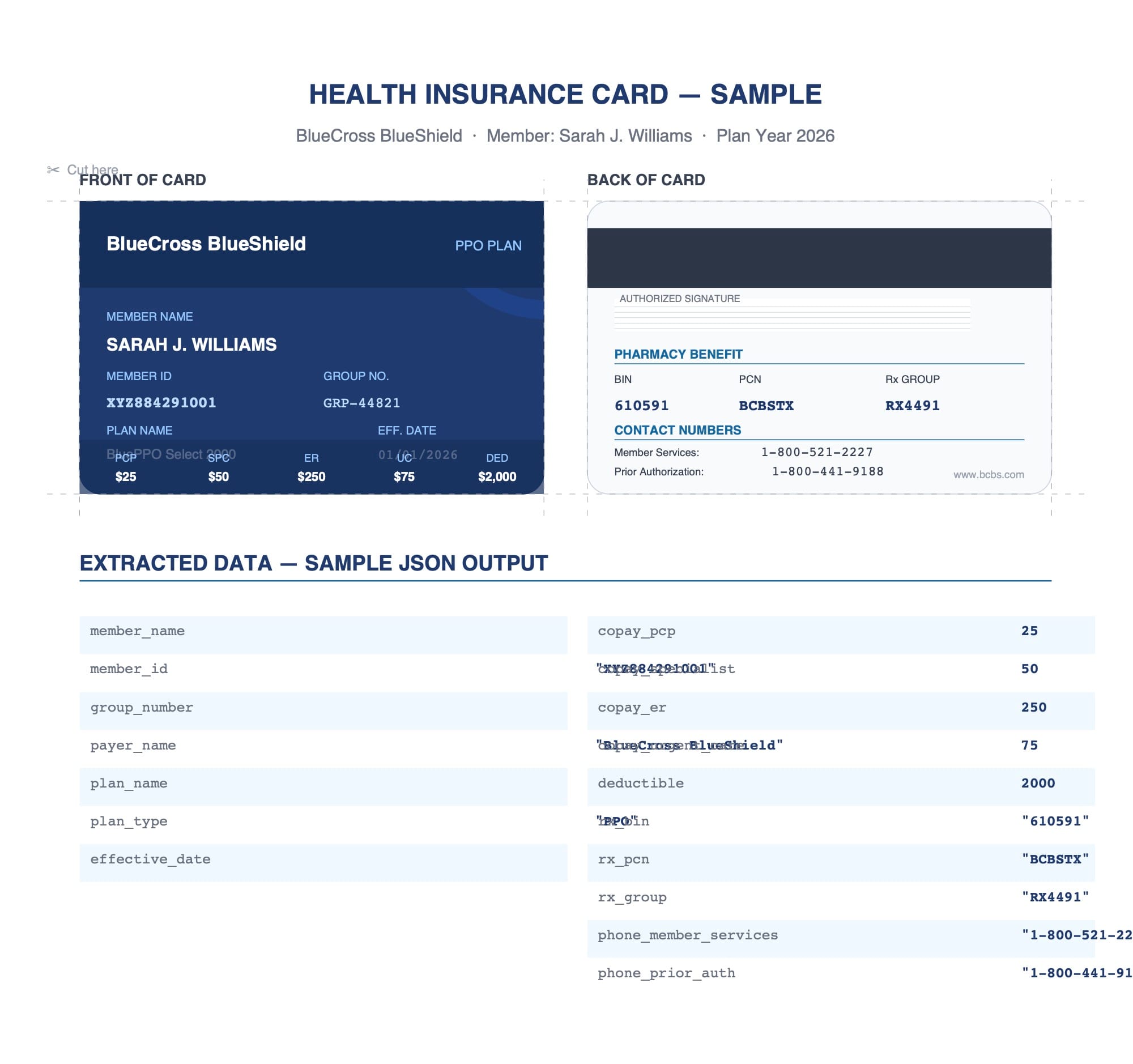
Fields that typically appear on a health insurance card include:
- Member name — the insured individual's full name
- Member ID / Member number — the unique identifier used in all claims and prior authorization requests
- Group number / Group name — links the member to their employer or plan group
- Plan type — HMO, PPO, EPO, HDHP, or similar plan classification
- Insurance company / Payer name — the carrier name used for claims routing
- Effective date — when coverage began, used for eligibility verification
- Copay amounts — primary care, specialist, emergency room, urgent care, and sometimes mental health visit copays
- Deductible — the annual out-of-pocket threshold before plan coverage kicks in
- Pharmacy codes — BIN (Bank Identification Number), PCN (Processor Control Number), and Rx Group number used to process prescriptions at the pharmacy
- Contact numbers — member services, prior authorization, and provider inquiry phone lines
In billing and intake workflows, the member ID, group number, payer name, and copay amounts are the highest-priority fields. The pharmacy codes (BIN, PCN, Rx Group) matter most for pharmacy benefit management. Parsio's pre-trained model extracts all of these as labeled fields in a single pass.
Why manual health insurance card data entry is a problem
Most healthcare front-office teams still capture insurance card data by reading it off a photo or scan and typing it into a registration form or EHR. At low volume this is manageable. At scale — or with high patient churn, insurance renewals, or multi-location operations — manual entry creates several compounding problems.
Transcription errors propagate downstream. A transposed digit in a member ID or group number causes a claim rejection. Correcting a rejected claim takes far more time than the original entry would have, and the error may not surface until days or weeks after the visit.
Staff time is absorbed by low-value work. Entering insurance card data is mechanical work that takes attention away from tasks that require human judgment. During peak intake periods, the bottleneck is often not patient volume — it is the speed at which staff can capture and verify insurance details.
Card images pile up without becoming useful data. Many practices collect card images from patients during online pre-registration or via secure messaging, but still route those images to a staff member for manual transcription. The image capture step adds no value if a human has to read it anyway.
Automating extraction with Parsio closes the gap between receiving a card image and having structured, usable data in your system.
How to extract data from health insurance cards with Parsio
Parsio uses a pre-trained AI model specifically calibrated for US health insurance cards. The model handles variation in card layouts, fonts, and formats across different payers without requiring any template configuration. Here is the full workflow.
Step 1 — Create an inbox and choose the parser type
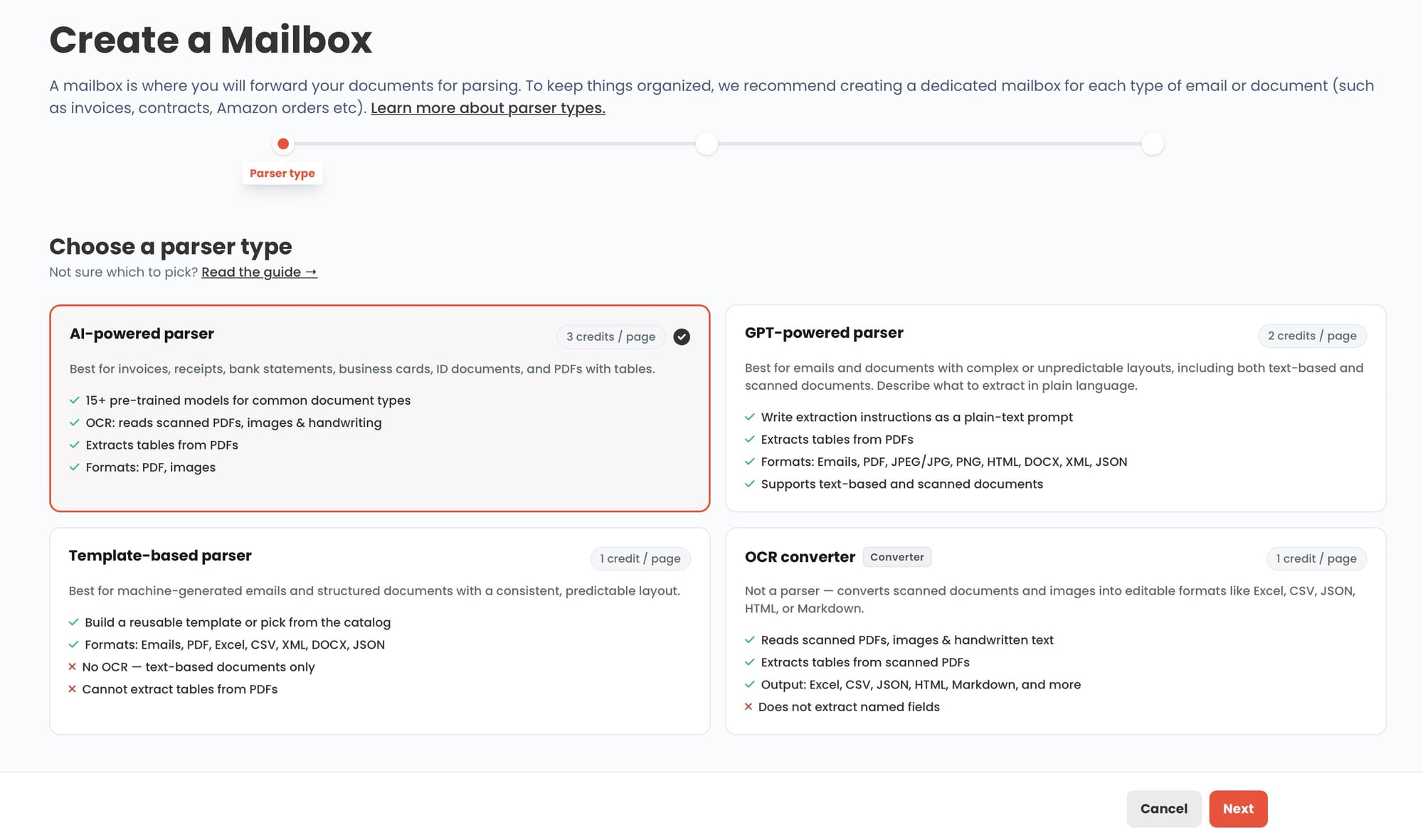
Log in to Parsio and create a new inbox. When selecting a parser type, choose AI-powered PDF parser. This is Parsio's pre-trained model family, which includes dedicated models for invoices, receipts, bank statements, ID documents, business cards, and health insurance cards.
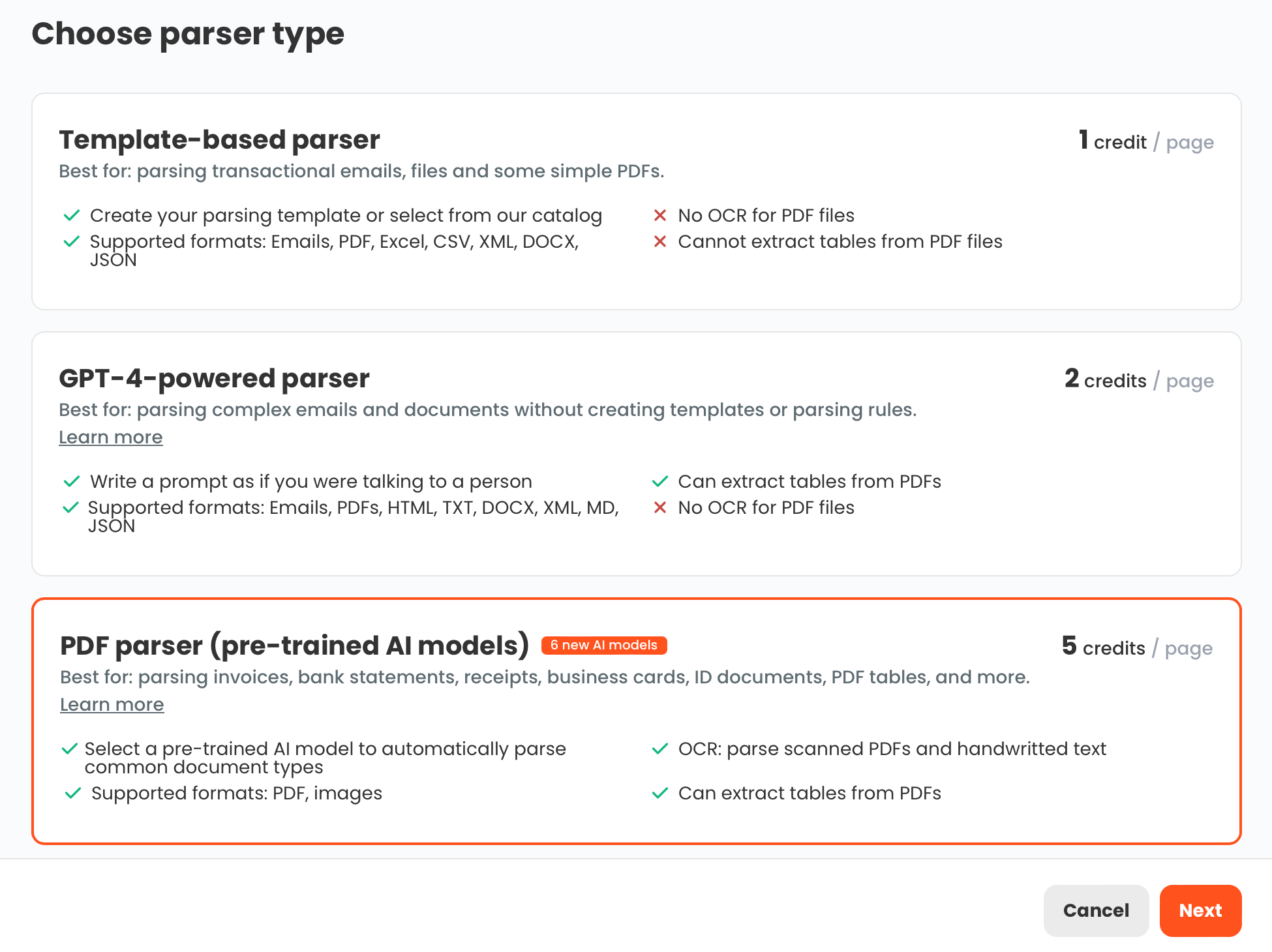
Step 2 — Select the Health Insurance Cards model
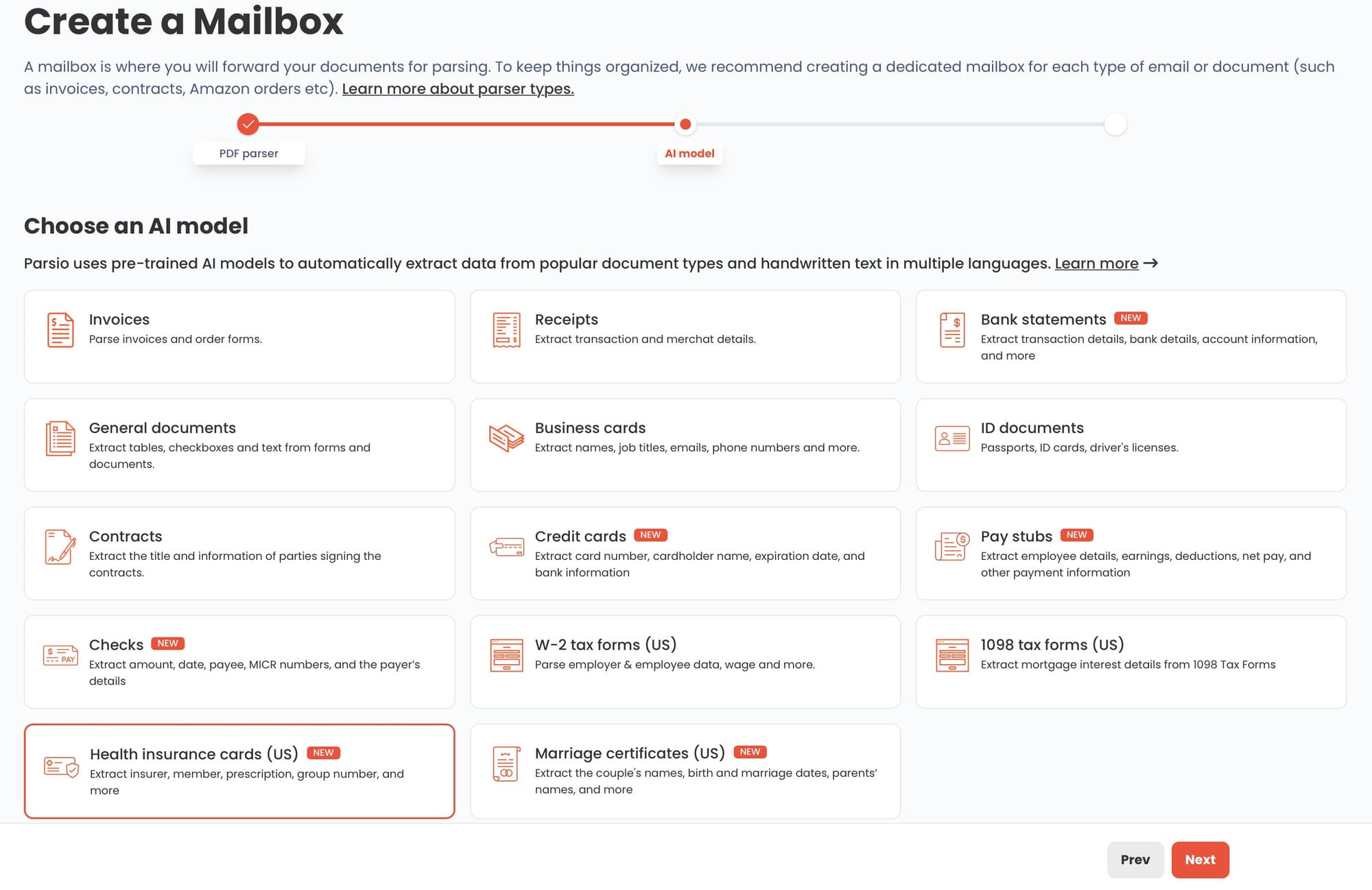
After choosing the AI-powered PDF parser, Parsio asks you to select the document type. From the model list, select Health Insurance Cards. This tells Parsio which pre-trained model to apply when documents arrive. No additional configuration or field mapping is required at this stage.
Step 3 — Upload or forward a health insurance card
Documents can reach Parsio in several ways:
- Manual upload — drag and drop a JPG, PNG, or PDF directly into the inbox
- Email forwarding — patients or staff forward card images or PDF attachments to a Parsio inbox email address
- API — send card images programmatically from a patient portal or registration system
- Zapier or Make — trigger a Parsio parse whenever a card image lands in Google Drive, Dropbox, an email inbox, or any connected app
Parsio accepts both physical card scans (photographed with a phone) and digital card PDFs from insurance portals. The AI model handles layout variation across payers — you do not need separate configurations for Aetna, Blue Cross, Cigna, United, or other carriers.
Step 4 — Review the extracted fields
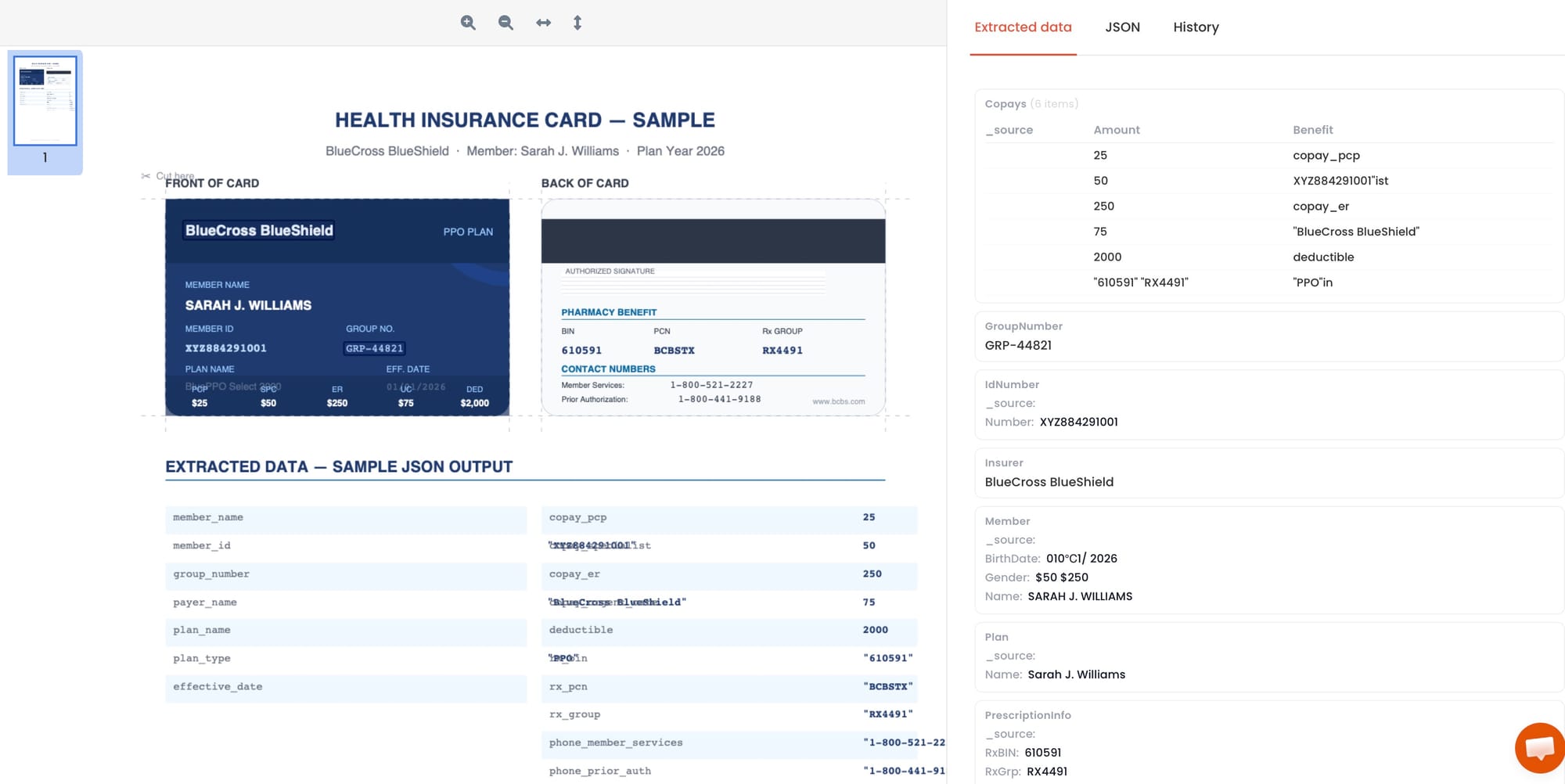
Within seconds of upload, Parsio returns a structured JSON record with the extracted fields. You can review the output directly in the Parsio interface alongside the original document. If a field was not clearly visible on the card, Parsio will leave it blank rather than guess — which is the correct behavior for billing-critical data.
Step 5 — Export to your downstream system
Once extraction is confirmed, the structured data can be sent to:
- Google Sheets — via Parsio's built-in Sheets integration, for tracking and review workflows
- Webhooks — POST the JSON payload to your EHR, practice management system, or internal API endpoint
- Zapier or Make — route extracted fields to any app in your stack: CRM, billing software, database, or notification tool
- CSV or Excel download — for batch processing or import into legacy systems
What fields does Parsio extract from health insurance cards?
The Health Insurance Cards pre-trained model is designed to extract the fields most commonly needed in patient registration and insurance billing workflows. The primary extracted fields include:
- Member name
- Member ID / Member number
- Group number and group name
- Plan name and plan type
- Insurance company and payer name
- Effective date / coverage start date
- Copay amounts for primary care, specialist visits, emergency room, and urgent care
- Deductible amount
- Pharmacy BIN, PCN, and Rx Group number
- Member services and prior authorization phone numbers
These fields map directly to what intake forms and billing systems typically require. The output is machine-readable JSON — no further parsing or cleanup needed before sending it to a downstream system.
For document types not supported by a dedicated pre-trained model, Parsio's GPT-powered parser is the right tool. It handles semi-structured or variable-format documents by generating an extraction prompt automatically from a sample document you upload — no prompt writing required.
Common challenges when extracting health insurance card data
Even with AI-powered extraction, a few real-world conditions affect accuracy and workflow design. Here is what to expect.
Card image quality
A blurry photo taken at an angle, with glare, or in poor lighting will produce lower-quality extraction results than a flat, well-lit scan. For the best results, provide card images where the text is sharp and the full card is visible. Many patient intake portals now prompt patients to capture both sides of the card in good lighting.
Non-standard or carrier-specific layouts
US health insurance cards vary considerably in layout across payers. Some carriers place the member ID prominently on the front; others bury it beneath a QR code. Parsio's pre-trained model is trained on a broad range of card formats, but rare or highly non-standard layouts may require review. Parsio's interface makes it easy to spot and correct any field that was not captured accurately.
Handwritten or partially obscured text
Older plans or manually issued cards sometimes contain handwritten fields. The AI model uses OCR under the hood and handles printed text well, but handwritten fields may extract with lower confidence. Building a human review step into the workflow for low-confidence results is a practical safeguard for billing-critical data.
Back-of-card data
Pharmacy codes (BIN, PCN, Rx Group) and some phone numbers appear on the back of the card rather than the front. If your workflow requires these fields, upload both sides of the card as a two-page PDF or as two separate files.
How extracted insurance card data fits into larger workflows
Health insurance card extraction is rarely an end goal on its own — it feeds into wider automation chains. Some common patterns:
Patient registration automation. When a patient completes a pre-registration form and attaches a card image, Parsio extracts the insurance fields and writes them into your practice management system via webhook or API before the patient arrives. Staff see pre-populated insurance data rather than a raw image to transcribe.
Insurance eligibility verification. Many clearinghouses and eligibility APIs require the payer name, member ID, and group number as query parameters. Once Parsio extracts these, they can be passed directly to a verification request via Zapier or a webhook, eliminating a manual lookup step.
Claims preparation. CMS-1500 and UB-04 claim forms require the payer name, member ID, and group number. Populating these from parsed card data rather than manual entry reduces claim rejections from transcription errors.
Annual insurance renewal processing. When patients renew coverage and send updated cards, Parsio can process them in batch — extract the updated fields and push them into the EHR or billing system automatically rather than having staff re-enter them one by one.
For a broader look at how Parsio handles other identity and structured documents alongside health insurance cards, see the guide to extracting data from ID documents using AI and OCR.
FAQ
Does Parsio work for health insurance cards from any US carrier?
Parsio's Health Insurance Cards pre-trained model is trained to handle a wide range of US health insurance card layouts, including major carriers such as Aetna, Anthem, Blue Cross Blue Shield, Cigna, Humana, Kaiser Permanente, and United Healthcare. Card layouts vary by carrier and plan, and some less common formats may produce lower-confidence results. Parsio's review interface makes it straightforward to verify and correct any field before the data flows downstream. The model is limited to US-format health insurance cards; international insurance document formats are not currently covered by the dedicated pre-trained model. For international or non-standard insurance documents, Parsio's GPT-powered parser can be configured to extract the relevant fields from a sample document without writing a prompt manually — Parsio generates the extraction prompt for you from the uploaded sample.
What image and file formats does Parsio accept for health insurance card extraction?
Parsio accepts JPG and PNG images, as well as PDF files, for health insurance card parsing. This covers the most common formats in healthcare intake workflows: phone photos captured during patient registration, scanned card PDFs attached to intake emails, and digital card documents downloaded from insurance member portals. If both sides of a card need to be captured, you can upload them as a two-page PDF or submit them as two separate document uploads. For automated workflows, card images or PDFs can also be sent to Parsio via email forwarding, API call, or automation platforms such as Zapier or Make — so the document does not need to go through a manual upload step at all.
How accurate is AI extraction for health insurance card data?
Accuracy depends primarily on the quality of the input image or scan. A clear, well-lit photo or flatbed scan of a card in good condition will typically yield very high accuracy for printed fields such as member ID, group number, payer name, and copay amounts. Factors that reduce accuracy include blurry or low-resolution photos, glare or shadows obscuring parts of the card, heavily stylized card designs where text blends into backgrounds, and handwritten fields. For billing-critical workflows, the standard practice is to build a lightweight human review step for any fields where Parsio's extracted value should be confirmed before it writes to the downstream system. Parsio's interface displays the extracted fields alongside the original document, making spot-checks fast and straightforward.
Can extracted health insurance card data be sent directly to an EHR or practice management system?
Yes. Parsio supports several integration paths for sending extracted data to downstream systems. If your EHR or practice management system exposes a REST API or accepts inbound webhooks, you can configure Parsio to POST the extracted JSON fields directly to that endpoint whenever a card is processed. For systems that do not have a direct API, Zapier and Make both have connectors for hundreds of healthcare and business applications, and Parsio connects to both platforms. You can also export extracted data as CSV or Excel files for batch import into legacy systems that require file-based data loading. For real-time registration workflows, the webhook approach is the most common choice because it eliminates the delay between card capture and data availability in the system of record.
Does Parsio store health insurance card images?
Parsio retains document images and extracted data according to its standard data retention policy. For healthcare organizations that handle protected health information (PHI) under HIPAA, it is important to review Parsio's data processing and security documentation before deploying it in a patient-facing workflow. Many healthcare operators use Parsio within internal staff workflows — such as scanning cards received in paper form — rather than as a direct patient-data collection endpoint, which may simplify compliance requirements depending on your organization's data governance policies. Always consult your compliance team when integrating any third-party extraction tool into a workflow that handles PHI.
What is the difference between the AI-powered parser and the GPT-powered parser for document extraction?
Parsio's AI-powered PDF parser uses pre-trained models built for specific document types — including health insurance cards, invoices, receipts, bank statements, ID documents, and business cards. These models are trained on large sets of real documents in each category, which means they require no configuration: you select the model and start extracting. The GPT-powered parser, by contrast, is Parsio's general-purpose option for documents that do not have a dedicated pre-trained model. It uses an LLM to extract the fields you specify, and Parsio can auto-generate the extraction prompt from a sample document you upload — so you do not need to write the prompt yourself. If you need to extract data from a document type that is not on the supported AI model list, such as a certificate of insurance, a packing list, or a utility bill, the GPT parser is the correct choice. For health insurance cards specifically, the dedicated pre-trained model will typically outperform a general GPT approach in both speed and consistency. For a deeper look at how these approaches compare, see PDF parsing methods compared: rule-based, zonal OCR, AI, and LLM approaches.